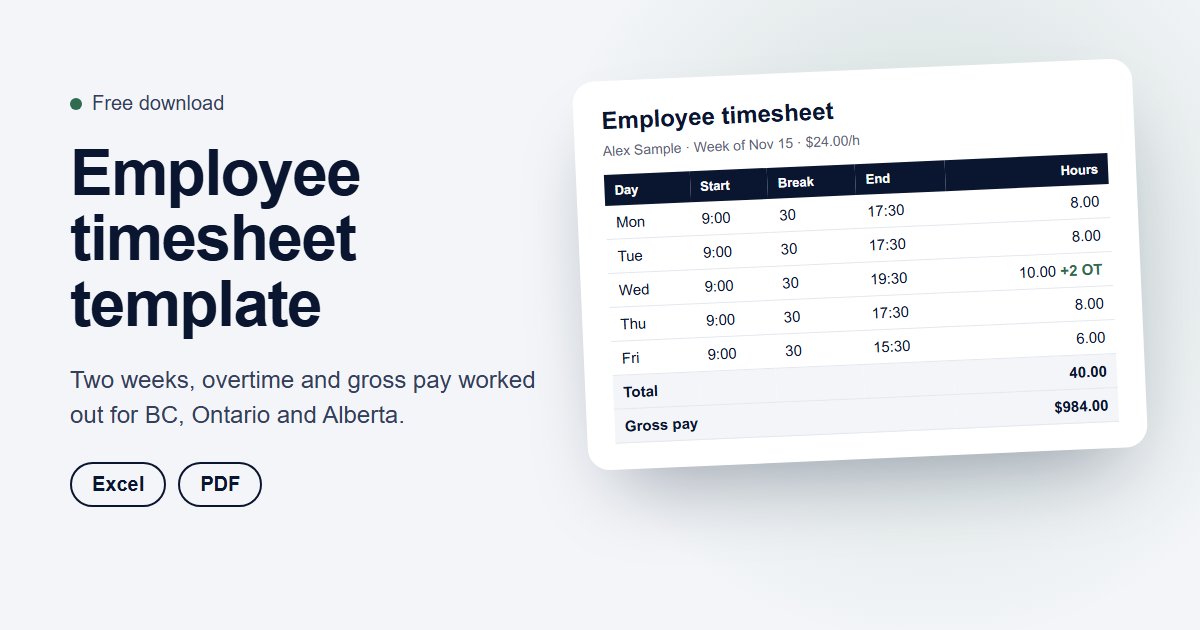
A timesheet is a record of when an employee started work, how long their unpaid breaks were and when they finished, for every day of a pay period. Below is a free two-week template you can download and use today: the Excel version adds up hours, overtime and gross pay for you, and the PDF prints on one page.
Download the template
- Excel timesheet template (.xlsx): two weeks, with hours, overtime and gross pay calculated, and a filled-in example.
- Printable PDF timesheet: one page, to fill in by hand.
Free, no sign-up. Works in Excel, Google Sheets and Numbers.
What is a timesheet?
A timesheet is the document payroll starts from. For each day it shows:
- the date and the day of the week
- the start time and end time
- the length of any unpaid break
- the hours worked that day
At the end of the pay period, the hours are added up, overtime is separated out, and the totals are multiplied by the hourly rate to get gross pay: the amount before CPP, EI and income tax come off.
Employment standards rules in every province require employers to keep a record of the hours their employees work. A signed timesheet is the simplest way to have one, and the first thing you'll be asked for if an employee questions a paycheque.
What's in this timesheet template
The Excel file has three tabs:
| Tab | What it's for |
|---|---|
| How to use | A short guide and the overtime settings for BC, Ontario and Alberta |
| Timesheet | The blank two-week timesheet you fill in |
| Example (BC) | The same sheet filled in for one employee, so you can see how it works |
The Timesheet tab covers a two-week (biweekly) pay period, the most common pay schedule in Canada, split into two Sunday-to-Saturday weeks. Yellow cells are for you to fill in; everything else calculates itself:
- Hours worked per day, from the start time, end time and break. Overnight shifts are handled.
- Daily overtime and double time, if your province has them.
- Weekly overtime, counting only hours not already paid as daily overtime.
- A pay period summary: regular hours, overtime hours, double-time hours and gross pay.
- Signature lines for the employee and a supervisor.
The PDF has the same layout for teams that still fill in timesheets by hand.
How to fill in the timesheet
- Enter the employee's details: name, employer, the Sunday the pay period starts and the hourly rate.
- Set the overtime rules for your province in the four cells at the top right (see the table below). BC is filled in by default.
- For each day worked, enter three things: start time (
9:00), unpaid break in minutes (30) and end time (17:30). Leave days off blank. - Check the totals. Each week shows total hours, daily overtime and weekly overtime; the summary shows gross pay for the period.
- Sign it. The employee and a supervisor sign and date the sheet before it goes to payroll.
Use the 24-hour clock (17:30, not 5:30) so Excel can't mistake an afternoon for a morning.
How to calculate hours worked
Hours worked = end time − start time − unpaid break.
The one mistake that catches almost everyone is minutes. Payroll uses decimal hours, so 7 hours 45 minutes is 7.75 hours, not 7.45. Divide the minutes by 60:
| Minutes | Decimal hours |
|---|---|
| 10 | 0.17 |
| 15 | 0.25 |
| 20 | 0.33 |
| 30 | 0.50 |
| 40 | 0.67 |
| 45 | 0.75 |
A shift from 9:00 to 17:15 with a 30-minute break is 8 hours 15 minutes, minus 30 minutes, which is 7 hours 45 minutes, or 7.75 hours. Paid at $24.00 an hour, writing 7.45 instead would underpay that one shift by $7.20.
The Excel template does this conversion for you.
Overtime rules in BC, Ontario and Alberta
Each province sets its own overtime rules, and the template has a setting for each. These are the general rules; averaging agreements and some industries are different.
| Province | Overtime at 1.5× | Double time (2×) |
|---|---|---|
| British Columbia | Over 8 hours a day, and over 40 hours a week (only the first 8 hours of each day count toward the 40) | Over 12 hours a day |
| Alberta | Over 8 hours a day or over 44 hours a week, whichever total is greater | None by default |
| Ontario | Over 44 hours a week | None by default |
In the template, enter daily overtime / double time / weekly overtime as 8 / 12 / 40 for BC, 8 / blank / 44 for Alberta and blank / blank / 44 for Ontario.
Sources: BC overtime pay, Alberta overtime hours and pay, Ontario overtime pay. Rules change, so check your province's current guidance before you rely on the settings.
A BC example. An employee works 8, 8, 10, 8 and 6 hours, Monday to Friday, at $24.00 an hour. That's 40 hours. Wednesday has 2 hours of daily overtime, leaving 38 regular hours, which is under the weekly limit of 40. Gross pay is 38 × $24.00 + 2 × $36.00 = $984.00. This is the example in the template's Example (BC) tab.
Common timesheet mistakes
- Writing minutes as decimals. 7.45 is not 7 hours 45 minutes (see above).
- Forgetting to deduct unpaid breaks, or deducting paid ones.
- Missed clock-outs. A blank end time on a Wednesday is easy to miss until payday, when nobody remembers when the shift ended.
- Adding daily and weekly overtime twice. In BC, hours already paid as daily overtime don't also count toward weekly overtime.
- Editing without a trail. If hours are changed after the fact, note who changed them and why.
- No signature. An unsigned timesheet is much harder to rely on in a pay dispute.
When a timesheet template stops being enough
A spreadsheet works well for a handful of staff. It starts to strain when you're chasing paper on payday, retyping hours into payroll, or handwriting a stack of cheques every two weeks.
That's the job MediKeeper was built for: staff clock in and out on a tablet with a four-digit code, employee timesheets fill themselves in with overtime worked out, missed clock-outs wait for you before the week can be locked, and approved hours print as numbered paycheques. It costs $20 CAD a month for the whole team, with 14 days free.
Frequently asked questions
Is this timesheet template free?
Yes. Both the Excel and PDF versions are free to download and use, with no sign-up.
Does it work in Google Sheets?
Yes. Upload the Excel file to Google Drive and open it with Google Sheets; the formulas work the same way.
Does the template calculate CPP, EI and income tax?
No. It works out gross pay (regular, overtime and double-time pay). CPP, EI and income tax deductions come from your payroll provider or the CRA's payroll deductions calculator.
Can I use it for weekly pay?
Yes. Fill in only Week 1 and leave Week 2 blank; the summary will show that week's totals.
How long should I keep timesheets?
Each province sets how long employers must keep records of hours worked. Check your provincial employment standards office for the period that applies to you, and keep signed timesheets at least that long.